Remote and hybrid work has become the norm across Africa's growing tech ecosystem. Whether your team is spread between Lagos and London, or you are collaborating with partners in Nairobi and New York, the ability to brainstorm, plan, and build together visually — regardless of physical location — is critical. Miro is the leading visual collaboration platform that makes this possible, and it has become an essential tool for distributed teams worldwide.
Miro provides an infinite digital whiteboard where teams can brainstorm ideas, map workflows, design user experiences, plan sprints, run workshops, and collaborate in real-time. Think of it as a massive virtual canvas where everyone can contribute simultaneously — with sticky notes, drawings, diagrams, mind maps, and more. This guide covers how African professionals and teams can use Miro to work more effectively together.
What Is Miro?
Miro is a cloud-based visual collaboration platform built for teams that need to think, create, and work together — even when they are not in the same room. The platform centres around an infinite whiteboard canvas that supports real-time collaboration, video conferencing, and a rich library of templates and integrations. Over 60 million users across 200,000 organizations use Miro, including many of the world's leading technology companies.
For African teams, Miro addresses a fundamental challenge of distributed work: the loss of whiteboard culture. When teams go remote, they lose the ability to gather around a physical whiteboard to sketch ideas, map processes, and solve problems visually. Miro recreates this experience digitally — and in many ways surpasses it, since digital boards are persistent, shareable, and not limited by physical space.
Key Features for African Professionals
1. Infinite Canvas
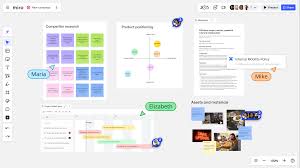
Miro's canvas has no boundaries. You can zoom in for detailed work, zoom out for big-picture views, and organize different workstreams on the same board. For African startups juggling multiple projects, product roadmaps, and strategy sessions, this means everything lives in one collaborative space — no more scattered documents, screenshots of whiteboards, and disconnected notes.
2. Ready-Made Templates
Miro offers hundreds of templates for common business activities: sprint planning, retrospectives, user journey mapping, SWOT analysis, mind mapping, org charts, Kanban boards, business model canvases, and much more. These templates are especially valuable for teams that are new to structured collaboration frameworks. Instead of starting from scratch, you can launch a brainstorming session with a proven template and customize it for your context.
3. Real-Time Collaboration
Multiple team members can work on the same board simultaneously. You see each collaborator's cursor moving in real-time, can leave comments on specific elements, tag teammates for input, and use the built-in timer and voting features to run structured workshops. For African teams spread across different cities or countries — and increasingly across different continents — this real-time capability eliminates the lag of asynchronous communication.
4. Built-In Video and Chat
Miro includes built-in video conferencing and chat, so you do not need to switch between a video call app and your whiteboard. You can start a video session directly within your Miro board, talk through ideas while pointing at specific elements on the canvas, and keep the conversation contextual. This integrated experience is smoother than sharing your screen on a separate video platform.